

expand
PDF Print E-mail


Download all of National Geographic's wallpapers with just one click


OverviewDownload Usage


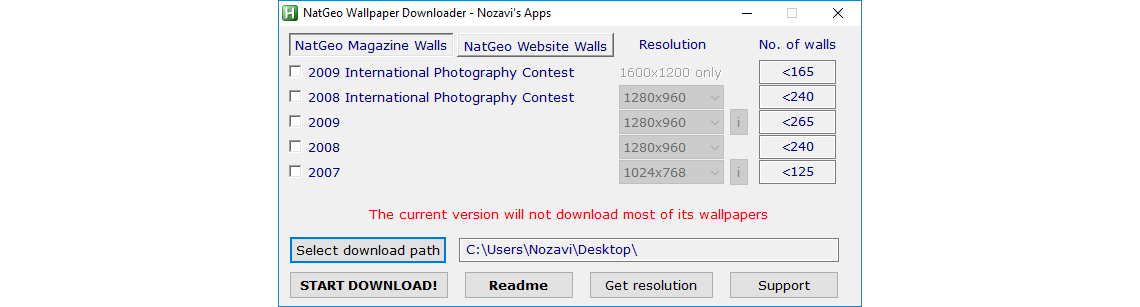
NGWD Screenshot 1NGWD Screenshot 2

NGWD Screenshot 3


National Geographic is one of the largest non-profit scientific and educational institutions in the world.


Over the years, it has also been a great source of amazing photos and wallpapers that mesmerized people from around the globe.


Some of the most beautiful wallpapers have been placed online, on the National Geographic website, but due to their large number, downloading them has been a problem until now.


With NatGeo Wallpaper Downloader you can download over 5000 National Geographic wallpapers with just one click.


Future builds will add even more packs like: History, Adventure, Traveler, Sea Monsters, Seabed, Blue Earth, Green Earth, Forces of Nature, Lewis & Clark, Roar and many more! (As you can see, I have my hands full, so don't miss out on these great wallpapers when they'll be added!)


Be advised: Downloading wallpapers can take a while if you're on a slow (modem/ISDN) connection! If you're not using a high-speed connection I'd advise you to download the wallpaper packs one by one.


Usage:

  1. Take a look at both categories (Natgeo Magazine Walls & Natgeo Website Walls)
  2. Check the collections you'd like to download
  3. Select the resolution for each collection (if you're not sure of your screen's resolution, press Get Resolution)
  4. Select the download folder (if you don't want them being placed on the desktop)
  5. Press Start Download!

Using the National Geographic wallpapers to create a screensaver

In Windows XP

  1. Open Control Panel (from the Start menu)
  2. If you're in Category View, click Appearance and Themes and then Choose a screensaver
  3. If you're in Classic View, run Display
  4. In the Screen Saver tab, select My Pictures Slideshow from the drop-down menu and click Settings
  5. In the My Pictures Screen Saver Options window, click Browse, select the path you chose in NatGeo Wallpaper Downloader as download path and then OK to close the window
  6. Press Apply and OK in the Display Properties window

See here the main steps described above

In Windows 7

  1. Open Control Panel (from the Start menu)
  2. If you're in Category View, click Change the theme
  3. If you're in Icons view, click Personalization
  4. Click Screen Saver in the bottom right on the Personalization window
  5. In the Screen Saver Settings window, select Photos from the drop-down menu and click Settings
  6. In the Photos Screen Saver Settings window, click Browse, select the path you chose in NatGeo Wallpaper Downloader as download path and then Save to close the window
  7. Press Apply and OK in the Screen Saver Settings window
  8. Close the Personalization window

See here the main steps described above

Plans for the future? (This time I'm not calling it a "to-do list", since I'm not sure I'll be able to make all these changes possible) Well, a lot more wallpapers, of course (so please don't forget to press the Support button and select at least one of the options that will enable you to stay up-to-date with future releases), most probably a two-tabs (Magazine/Website) main interface, a shutdown when download process is over option, a faster resume alternative, and, hopefully, I'll be able to add a simple wallpaper changer mode and a Windows 7 theme creator (the last two basically have the same functionality, but themes are very easy to share with family and friends or other computers - so, sharing your favorite wallpapers will be a lot easier).


If you have a few ideas of your own, please don't hesitate to post them on the Support Forum.


You can get the latest version of NatGeo Wallpaper Downloader for free by clicking here.


Add this page to your favorite Social Bookmarking websites
Digg! Reddit! Del.icio.us! Google! Live! Facebook! StumbleUpon! Yahoo! Joomla Portal
 
AddThis

Testimonials

The System Silencer has proved to be one software that has reduced my worries to a great extent. now I can easily control the various background applications and their behavior during idle time. I highly recommend this 'system tool' to control your workstation(s).

Varinder
Oct 18, 2010

Facebook

Share on facebook

Twitter

Follow us on Twitter

Social Bookmarking

Add this page to Blinklist Add this page to Del.icoi.us Add this page to Digg Add this page to Facebook Add this page to Furl Add this page to Google Add this page to Ma.Gnolia Add this page to Newsvine Add this page to Reddit Add this page to StumbleUpon Add this page to Technorati Add this page to Yahoo
Donations are a great way to show your appreciation for the above software and, most importantly, support its future development. Therefore, if you like Nozavi's Apps and you'd like to see it grow bigger, consider making even the smallest donation. More details here.
Thank you!
Home NGWD Overview